Using JMS with ADF Business Components
There are use case scenarios where you may need to perform some service calls asynchronously, whose out put does not affect the success or failure of the entire business process. Some examples could be sending SMS notification on successful airline ticket booking or logging business data on data change etc. A possible solution for above case may be queuing the request/data for later process and configuring a listener on this Queue to process them asynchronously. In Java EE world, the Java Messaging Service (JMS) provides basic infrastructure for queuing messages. Interestingly, you can easily enable ADF Business Components to use JMS if your use case demands so. Sounds interesting? then read on... :)
Use case
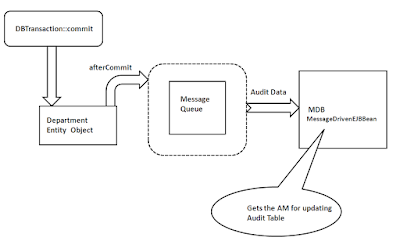
In this example, I'm populating an 'audit' table whenever user commits the modified Department details. This audit table is updated asynchronously using a Message Driven Bean. The high level flow is depicted in the following diagram.
Download
You can download the sample workspace from here.
[Runs with Oracle JDeveloper 11g R1 PS3 + HR Schema]
Prerequisite for running the application
I. Create the table DEPARTMENTS_AUDIT to hold audit data for the Departments entity. You can either use the below given DDL or the script available in the above work space - <ADFJavaEEApp>/EJBModel/audit_tablescript.sql
II. Configure the Queue Connection Factory and the Queue using Weblogic Admin Console. To do this configuration, you may need to define JMS Server and JMS Modules first. Don't worry, its easy!

Please refer the the below two links if you need detailed explanation on this topic
1. Configuring JMS Queues and Topics
2. JMS in JDeveloper 11g and WebLogic 10.3
High level steps for configuring Queue Connection Factory and Queue are given below.
1. Define the JMS Server. While defining, please select 'DefaultServer' as Target in the second page of the wizard.

2. Define the JMS Module. Please select 'DefaultServer' as Target in the second page of the wizard.

Nest step is to configure Queue Connection Factory and Queue for the JMS Module that we defined just now.
3. Open JMS Module that you defined in the previous step and Configure Queue Connection Factory. The JNDI name used in this examples is 'jms/QueueConnectionFactory'. So you may need to provide the same name here as well.
4. Open JMS Module that you defined in the step 2 and configure Queue. The JNDI name used in this examples is ' jms/testQueue'. So you may need to provide the same name here as well. While defining Queue, please select a subdeployment (if available) on the second page of the wizard. Please create new one, if nothing is listed in the drop down. If you are creating a subdeployment, then use the JMS server that you defined in Step1 as the target for deployment.

A glance at the implementation
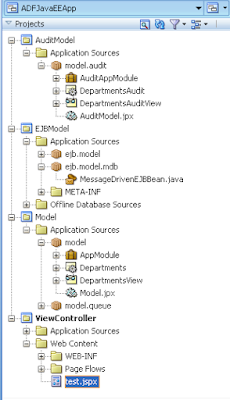
The application has 3 model projects.
1. EJBModel - This contains Message Driven Bean(MessageDrivenEJBBean) implementation. The MessageDrivenEJBBean::onMessage(...) uses 'AuditAppModel' for updating DEPARTMENTS_AUDIT table.
2. AuditModel - This is for populating audit table. This is used from the MessageDrivenEJBBean.
3. Model - This contains Department EO and VO used by the UI.
This example has overridden DepartmentsImpl::afterCommit() for sending the audit data(Original values of Department entity - values before user update) to the queue that we configured. The class model.queue.QueueHandler does the queuing of audit data. The MessageDrivenEJBBean listens on the same Queue, so whenever data is put on this queue, MessageDrivenEJBBean gets notification and it's onMessage methods invoked. The auditing logic resides in this method.
How To run this sample?
1. Run test.jspx
2. Modify Departments attribute values and click on Commit.
3. Query the values from DEPARTMENTS_AUDIT using SQL Worksheet. You may notice new entries holding the previous values of the modified Departments record in this table.

Learn More ...
There are a lot more points like this. If you are curious to learn the internals of the ADF Business Components and ADF Binding Layer, the following book is for you - Oracle ADF Real World Developer’s Guide.
More details about this book can be found in this post- http://jobinesh.blogspot.in/2012/07/pre-order-your-copy-of-oracle-adf-real.html
Use case
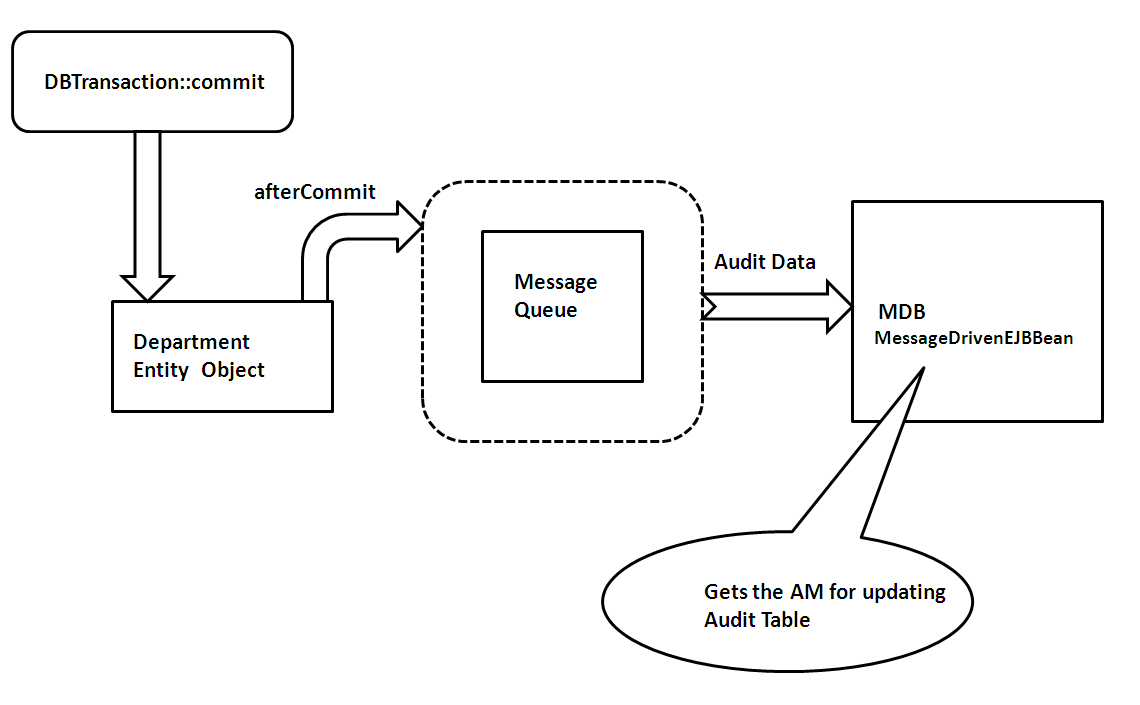
In this example, I'm populating an 'audit' table whenever user commits the modified Department details. This audit table is updated asynchronously using a Message Driven Bean. The high level flow is depicted in the following diagram.
Download
You can download the sample workspace from here.
[Runs with Oracle JDeveloper 11g R1 PS3 + HR Schema]
Prerequisite for running the application
I. Create the table DEPARTMENTS_AUDIT to hold audit data for the Departments entity. You can either use the below given DDL or the script available in the above work space - <ADFJavaEEApp>/EJBModel/audit_tablescript.sql
 CREATE TABLE DEPARTMENTS_AUDIT
 (
  DEPARTMENT_ID NUMBER(4, 0) NOT NULL
 , DEPARTMENT_NAME VARCHAR2(30 BYTE)
 , MANAGER_ID NUMBER(6, 0)
 , LOCATION_ID NUMBER(4, 0)
 , MODIFIED_TIME TIMESTAMP(6) NOT NULL
 , CONSTRAINT DEPT_AUDIT_CONSTRAINT PRIMARY KEY
  (
   DEPARTMENT_ID
  , MODIFIED_TIME
  )
  ENABLE
 )
II. Configure the Queue Connection Factory and the Queue using Weblogic Admin Console. To do this configuration, you may need to define JMS Server and JMS Modules first. Don't worry, its easy!

Please refer the the below two links if you need detailed explanation on this topic
1. Configuring JMS Queues and Topics
2. JMS in JDeveloper 11g and WebLogic 10.3
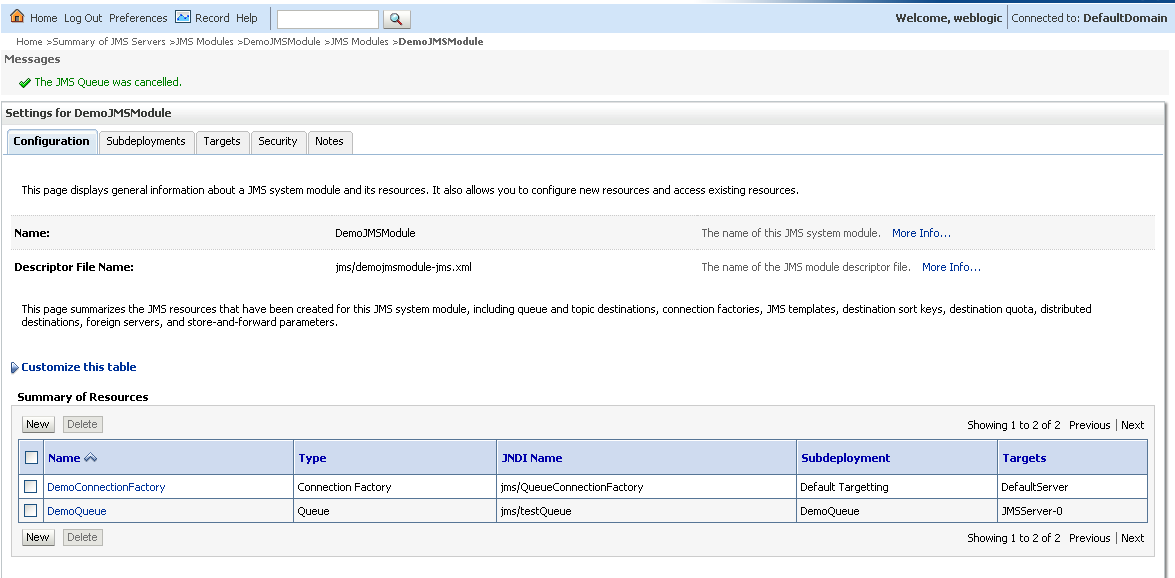
High level steps for configuring Queue Connection Factory and Queue are given below.
1. Define the JMS Server. While defining, please select 'DefaultServer' as Target in the second page of the wizard.

2. Define the JMS Module. Please select 'DefaultServer' as Target in the second page of the wizard.

Nest step is to configure Queue Connection Factory and Queue for the JMS Module that we defined just now.
3. Open JMS Module that you defined in the previous step and Configure Queue Connection Factory. The JNDI name used in this examples is 'jms/QueueConnectionFactory'. So you may need to provide the same name here as well.
4. Open JMS Module that you defined in the step 2 and configure Queue. The JNDI name used in this examples is ' jms/testQueue'. So you may need to provide the same name here as well. While defining Queue, please select a subdeployment (if available) on the second page of the wizard. Please create new one, if nothing is listed in the drop down. If you are creating a subdeployment, then use the JMS server that you defined in Step1 as the target for deployment.
A glance at the implementation
The application has 3 model projects.
1. EJBModel - This contains Message Driven Bean(MessageDrivenEJBBean) implementation. The MessageDrivenEJBBean::onMessage(...) uses 'AuditAppModel' for updating DEPARTMENTS_AUDIT table.
2. AuditModel - This is for populating audit table. This is used from the MessageDrivenEJBBean.
3. Model - This contains Department EO and VO used by the UI.
This example has overridden DepartmentsImpl::afterCommit() for sending the audit data(Original values of Department entity - values before user update) to the queue that we configured. The class model.queue.QueueHandler does the queuing of audit data. The MessageDrivenEJBBean listens on the same Queue, so whenever data is put on this queue, MessageDrivenEJBBean gets notification and it's onMessage methods invoked. The auditing logic resides in this method.

How To run this sample?
1. Run test.jspx
2. Modify Departments attribute values and click on Commit.
3. Query the values from DEPARTMENTS_AUDIT using SQL Worksheet. You may notice new entries holding the previous values of the modified Departments record in this table.

Learn More ...
There are a lot more points like this. If you are curious to learn the internals of the ADF Business Components and ADF Binding Layer, the following book is for you - Oracle ADF Real World Developer’s Guide.
More details about this book can be found in this post- http://jobinesh.blogspot.in/2012/07/pre-order-your-copy-of-oracle-adf-real.html
Hi Jobinesh,
ReplyDeleteI have a login page in my project which asks for username and password. it's Login.jspx page and it does not respond to hitting Enter key. User has to click on the Login button to login. How can I make it to respond to Enter key. Also, kindly tell me which View Object in the JHeadStart is used to validate username and password?
Hello Jobinesh,
ReplyDeleteI have a requirement to run the MDB independantly as an application, and put message from many applications to a queue. But I need to call the App Module from inside the MDB application. So I have created an MDB and an App Module inside that application. But when I deploy the application MDB is not getting started listening to the queue. I have tried to make the Model project as an EJB jar and, while running MDB is listening but I cannot get App Module (because Configuration class in unknown to the MDB). Could you please suggest a solution
Make sure application module and related things are accessible(available in the class path) from MDB. I dont see any other complexities in your case.
ReplyDelete